Let’s talk about how we can build your commerce project — tailored to your business, powered by Rigby
Choosing between Medusa and Shopify is a choice between buying eCommerce software and building it. Shopify sells you a store that will be working in a few days, for a monthly fee, a percentage of every sale, and vendor lock-in. Medusa gives you full ownership and does not charge you for selling, but in exchange, it requires weeks of development before the platform goes live.
This comparison covers all the factors I weigh as a CTO before I advise clients on which fits their business:
- Purpose
- Architecture
- Costs in 2026
- Customization
- Frontend
- Payments and integrations
- Performance and scalability
- Security and compliance
- SEO
- Support and development resources
- Programming language and developers
- Ease of use
For a quick comparison of the two platforms, take a look at the table below. Talk to my team, and we will calculate what your business would cost on each platform.
Key insights
- Shopify charges a percentage of every sale through card rates, and up to 2% more if you use third-party payment gateways instead of Shopify Payments. Medusa does not charge anything on your online sales.
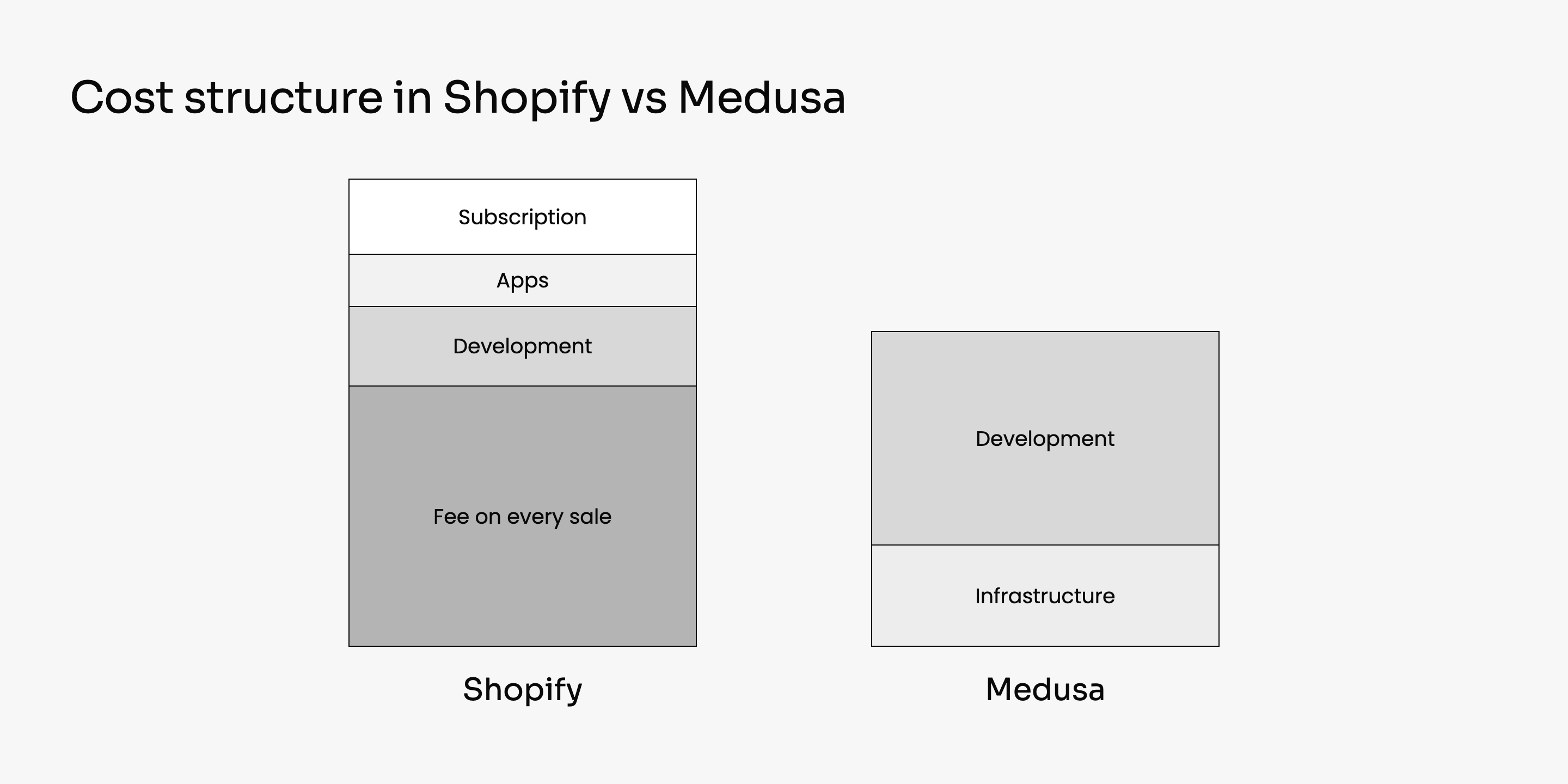
- Medusa is expensive for a small store because the build costs the same regardless of what the order volume turns out to be. Shopify is expensive for a large store because it charges a percentage on every order – killing your business growth.
- On Shopify, you can add or customize only what Shopify allows. On Medusa, you can do anything your developers have time to build.
- Teams migrate off Shopify because of the percentage it takes from every order, and because of the vendor lock-in underneath it: the code is not yours, so you can change your store only as far as Shopify allows.
Use case: +30% checkout conversion after migrating from Shopify Plus to Medusa
Healthletic sells dietary supplements as one-time purchases and as subscriptions, with about $24M in yearly sales. The brand was on Shopify Plus and paying about $25,000 a month, because the platform fee grew with order volume and the checkout charged a percentage on top.
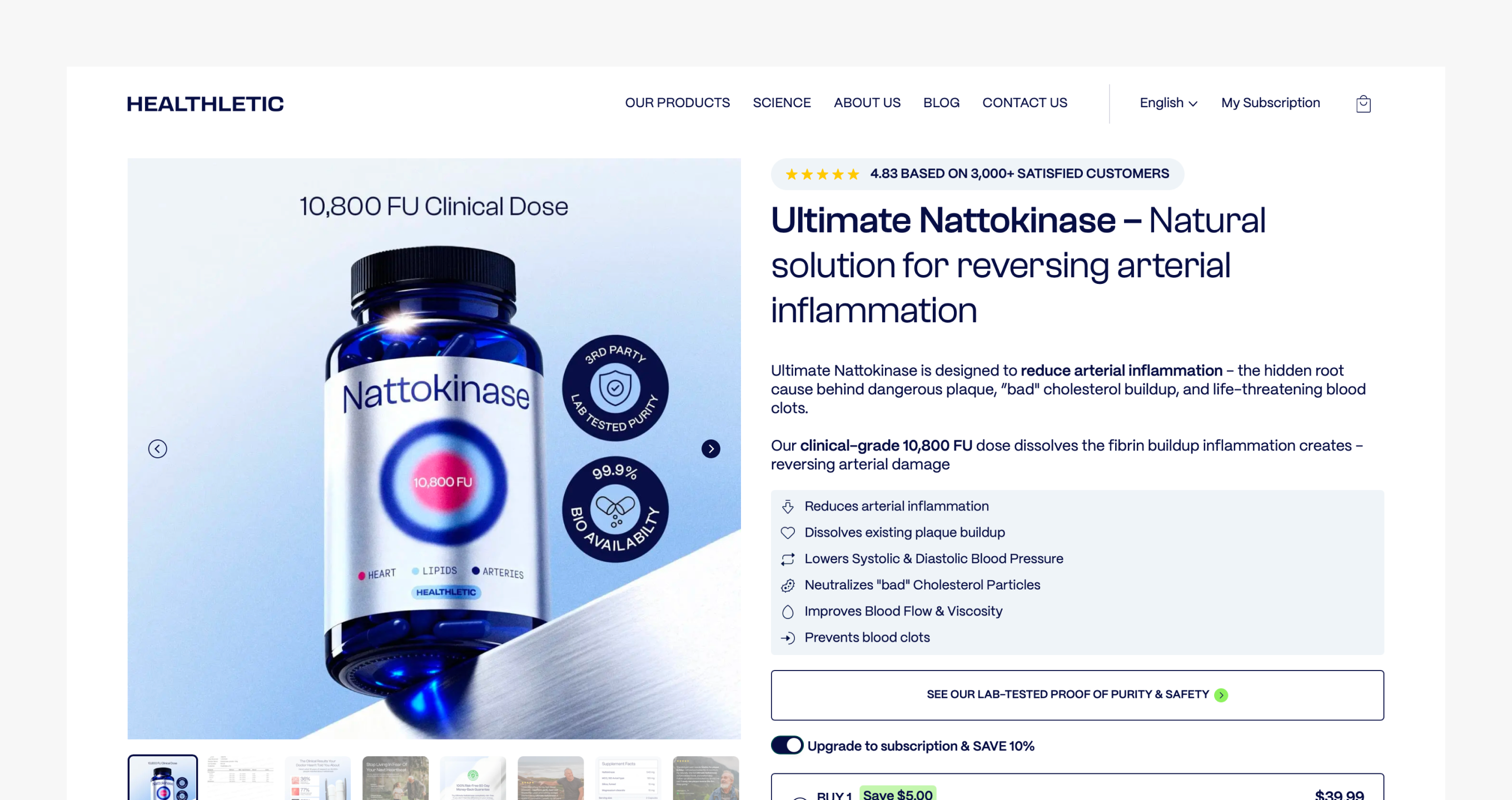
Healthletic had subscription rules and payment requirements that Shopify's checkout could not express.
Subscribers had to be able to pause a delivery, skip one, swap the product, or change how often it arrives, from their own account page instead of through a support ticket.
Healthletic also needed cards, Apple Pay, Google Pay and PayPal behind one checkout, with refunds handled in the same place, and Shopify's checkout decides for you which payment methods you get.
Those two requirements weighed more in the migration decision than the $25,000 a month did.
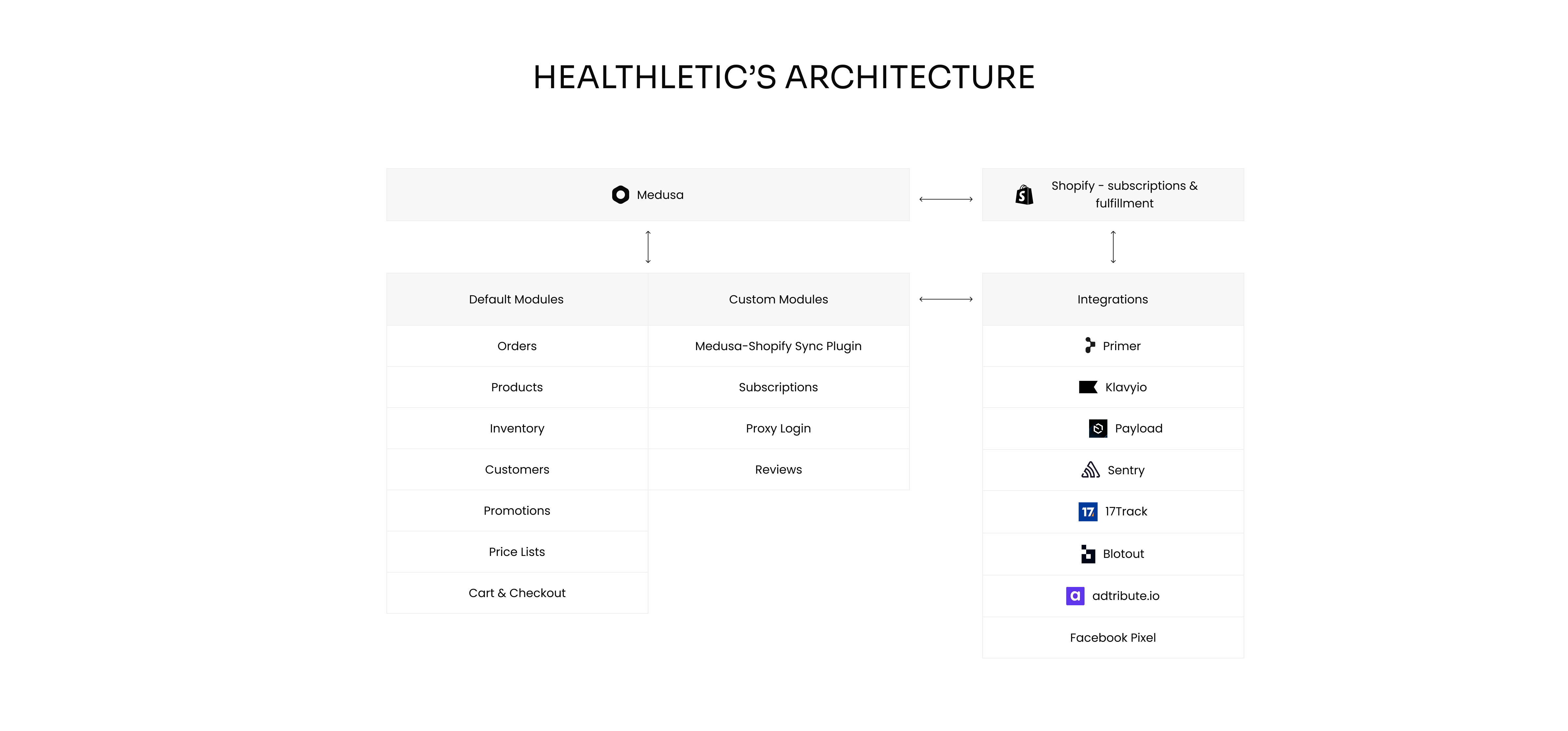
So my team rebuilt the commerce side on Medusa: the catalogue, the cart, the checkout, the subscription billing, and the payments. Everything after the order stayed where it was, so the warehouse, the 3PL, and the support desk carried on with the same tools and the same process. Existing subscribers kept their accounts and their billing dates, with no re-authentication and no missed renewal.
Checkout conversion came out about 30% higher than on Shopify Plus in the first month after the migration. The lift came from the checkout page itself: Apple Pay and Google Pay now sit at the top of it, so a customer whose wallet is already set up can pay before typing anything.
Healthletic also decides how each payment is routed now, instead of taking the routing Shopify provides. The platform bill stopped growing with order volume at the same time, because the cost is infrastructure instead of a share of every order.
The Healthletic case study has the full architecture and the tooling around it.
About platforms: Shopify vs Medusa purpose

Both platforms give you a catalogue, a cart, a checkout, and an admin panel. In short, on Shopify you rent all four and configure them, and on Medusa you own the code behind them and change whatever you like.
What is Shopify?

Shopify is a hosted eCommerce platform that gives you a store, a checkout and an admin dashboard without touching a line of code. You pick a theme, add products, connect a payment provider, and sell.
Most store owners never open anything beyond the Shopify dashboard. Shopify handles the hosting infrastructure, the security patches, the uptime, and the compliance, and you pay a monthly subscription for it.
A founder with no technical resources can have a store online in days and start selling as soon as the payment provider approves the account.
Pros
- You can launch a working eCommerce store in days, with no developer involved at any point.
- The Shopify App Store carries thousands of apps, so most things a normal store needs exist as a toggle.
- Hosting, updates, uptime, and PCI compliance are Shopify's job, which removes work from your team.
Cons
- You are selling inside somebody else's software, so your customization ends where Shopify decided it ends.
- You do not keep the full price of what you sell, because Shopify takes a percentage of every order, and that amount grows as your sales grow.
What is Medusa?

Medusa is an open-source, headless commerce framework built on Node.js and TypeScript. Its core is MIT-licensed, so there is no licence fee and no limit on what you build with it.
Medusa fits when your custom logic is unusual enough that configuring somebody else's product stops working: subscription billing with your own rules, B2B accounts with negotiated pricing, a multi-vendor marketplace, or a checkout that does something no template anticipated.
Pros
- You get the source code, so there is no limit on what you can change and no vendor to ask for permission.
- There are no platform fees, no licence cost, and no percentage of your online sales.
- Commerce logic lives in commerce modules your developers extend, so custom functionalities survive upgrades instead of being rewritten after them.
Cons
- The first production version takes weeks of development.
- Your team or your technology partner carries the maintenance.
Architecture: monolithic platform against composable commerce
Shopify delivers every part of the store as one product. Medusa gives you a commerce engine and lets you choose the frontend, the CMS, and the search.

Shopify architecture
Shopify is a monolithic architecture, which means the whole store is a single piece of software owned by one vendor. The store, cart, checkout, admin panel, and payments all come from Shopify, so you don't pay for integration work.
For the owner, that means the vendor's limits are your limits. Everything your store does well and everything it can't do comes from the same company, and you can't swap the weak part for a better product from somewhere else.
In a composable setup, a slow checkout or a weak search is replaced with a different product in a few weeks. On Shopify, the same problem is either an app bolted on top with its own monthly fee, or a reason to change the platform entirely.
You extend Shopify with apps from its App Store and with Shopify Functions for a defined set of backend logic. Almost every app is a paid monthly subscription, so what your store can do ends up being the sum of what you pay for each month.
Shopify decides what the platform allows. When it changes a rule or retires a feature, your store changes with it.
Pros
- Everything connects out of the box, so you spend no time integrating the parts of your own store.
- Shopify updates the platform without asking you, and those updates don't break your store.
Cons
- Any unusual requirement starts with finding out whether Shopify allows it at all.
- A change to the platform's rules is a change to your store, and you have no vote in it.
Medusa architecture
Medusa is a composable architecture, which means the store is assembled from separate pieces instead of bought as one. Medusa itself is only the commerce engine, so the storefront, CMS, and search are products you choose, and your developers connect them to the engine through Medusa's REST APIs.
You pay for that connecting work at the start. In return, you can replace any one of those parts later without rebuilding the store.
Your own commerce logic lives in custom modules beside the core instead of inside it, so an upgrade doesn't overwrite what your team paid to build. This API-first approach is what people mean by composable architecture: you assemble the commerce stack from parts you choose, including CMS, search, and payment solutions.
Pros
- You choose every piece of the commerce infrastructure around the engine and can replace any of them later without disruptions.
- Custom modules extend the core without forking it, so an upgrade doesn't undo your work.
- You keep full control over the commerce stack, from the database schema to the rendered page.
- The same backend serves a web store, a mobile app, and any other channel through the same APIs.
Cons
- Every part of the stack is a separate product with its own price and support desk, so somebody on your side has to keep track of all of them.
Costs: fees on every order against a development budget
Every price in this section was read from the vendor's own pricing page in November 2026.
Shopify pricing
These are Shopify's published plans, with the yearly billing option selected. Paying monthly costs more on every plan. Our breakdown of how much Shopify costs in 2026 has the full calculation.
Three more charges add on top of the subscription.
- Card rates. Shopify Payments lists US rates from 2.9% + 30¢ per online transaction, and the rate you get depends on your specific Shopify plan.
- Third-party transaction fees. Using a payment provider other than Shopify Payments costs up to 2% of the order on the entry plan, and less on higher plans.
- Apps. On the Basic plan especially, a realistic stack of subscriptions, reviews, search, and loyalty apps adds a monthly bill of its own, and those prices usually rise with your order volume.
Pros
- The entry price is low enough to test a new market with no tech skills.
Cons
- The fee for third-party payment gateways is the most expensive line for anyone who has negotiated their own payment rates.
- App subscriptions grow with your order volume, so the bill is highest in your busiest months.
- You can't predict your costs, because they depend on how much you sell.
Medusa pricing
Medusa is open-source, so it costs $0 for the commerce engine. Medusa's pricing page states no GMV tax and no special licenses, so there are no platform fees and no percentage of your online sales. Medusa build needs technical knowledge and time for development.
The bill is infrastructure. You can self-host on your own cloud and pay for servers, the database, and whoever maintains them, or take Medusa Cloud to manage hosting, deployments, and backups for you.
Pros
- Your platform cost stays flat as sales grow, because you aren't charged per order.
- Self-hosting capabilities mean you can put the Medusa server on infrastructure of your choice.
Cons
- Development is longer and requires a tech team.
- Maintenance is continuous work.
Customization: templates against complete control
Both platforms let you change how your store looks and behaves. On Shopify, the limit is set by Shopify, and on Medusa it is set by your resources.
Shopify customization
Shopify lets you change a lot, up to a limit it sets. Themes are flexible, Shopify Functions let you write backend logic for discounts, shipping, and payment customization, and custom apps can extend the admin dashboard.
For most stores, that is enough, and you don't have to connect anything manually.
Pros
- Customization is fast, because the platform already supplies the parts you are changing.
- Shopify Functions cover the backend logic most stores need, including discount and shipping rules.
Cons
- Checkout customization is limited to what Shopify exposes, and the fully customizable checkout is available only on Shopify Plus.
- Custom payment integrations have to fit the payment API Shopify publishes.
- A pricing rule that Shopify doesn't support ends as a workaround, or as a reason to leave the platform.
Medusa customization
On Medusa, the same work starts in the source code. Developers shape commerce logic in TypeScript and Node.js, custom modules extend the core, and no part of the platform is off limits.
Custom modules extend the platform's functionalities without touching the core, so you can build a B2B quote process, a subscription cycle, or a multi-vendor payout model exactly as you designed it.
Pros
- Custom solutions stay yours, including the data model behind them.
- Your operations team gets the features its own workflow needs.
- Anything you build is documented in Medusa's docs and written in a language most JavaScript developers already know.
Cons
- Everything that flexibility gives you is also something your team builds and then maintains.
Frontend: themes against frontend freedom
Shopify gives you a finished storefront and lets you edit it. In Medusa, you have to build your storefront, but you do it on your own terms and customize it to your needs.
Shopify frontend
Shopify's presentation layer is Liquid themes, and the pre-built templates are good. A theme gets you a complete, responsive online store with no frontend work at all.
You can also go headless through the Storefront API and build a custom frontend, and from then on your team maintains the frontend.
Pros
- A pre-built theme is a working storefront in days, and the paid ones aren't that expensive.
- Theme code is editable, so a designer can take a template a long way without a developer.
Cons
- Shopify limits customization to its predefined templates unless you go headless and build the frontend yourself.
- Some themes aren't built with Core Web Vitals in mind, and you inherit whatever the author wrote.
Medusa frontend
Medusa's headless architecture means the storefront is a separate application in Next.js, Nuxt, Astro, or whatever your team writes, connecting to the backend over APIs.
You don't start from an empty folder, though. Medusa publishes a library of starter storefronts for different kinds of stores, including B2C, B2B with quotes and company accounts, a made-to-order product configurator, a retail POS app, and a multi-vendor marketplace.
The command npx create-medusa-app@latest --with-nextjs-starter installs the backend and a working Next.js storefront together, with product pages, cart, checkout, customer accounts, and Stripe already wired up.
A starter is a codebase you own rather than a theme you rent. Your developers change any part of it, and an update to Medusa doesn't overwrite what they changed.
If the shopping experience is what sets you apart, frontend freedom is the reason to choose Medusa.
Pros
- You can use modern web technologies and your own design system instead of a theme written for everyone.
- Page speed becomes a decision your team makes. The most popular solution is Next.js and Vercel for the frontend layer.
- The same backend serves a web store and a mobile app without building the commerce logic twice.
Cons
- There is no frontend until your developers build one.
Payments and integrations: an app store against an API
Shopify earns money on your payments and hands you 8,000 apps. Medusa doesn't earn anything on your payments and hands you an API.
Shopify payments and integrations
Shopify Payments is the default and the cheapest route. Bringing your own provider costs up to 2% of each order, which is how Shopify keeps you on its own processor.
Shopify's ecosystem covers integrations with CRM platforms, marketing tools, and ERPs through the App Store, and most install with a click.
Pros
- Thousands of integrations install with a click, with no development time.
- Shopify Payments is set up in minutes and needs no contract with a separate processor.
Cons
- Shopify charges transaction fees for third-party payment gateways
- An app you depend on can raise its price or disappear, and your store has no say in it.
- Shopify’s checkout decides which payment methods you can offer, which is one of the reasons why businesses left for a setup where it routes payments itself.
Medusa payments and integrations
Unlike Shopify, Medusa doesn't charge you extra for bringing your own payment provider. It integrates with Stripe, Klarna, Adyen, and PayPal out of the box, and with anything else through its APIs and plugins.
Pros
- You keep the payment rates you negotiated, because Medusa doesn't charge you for using your own provider.
- Custom integrations can reach most systems, including an ERP that no app store covers.
Cons
- Every integration is a development task.
- Somebody has to maintain those integrations.
Performance and scalability: managed infrastructure against your own
On Shopify, performance is something you buy and can't tune past a point. On Medusa, it is the result of what your team builds and what you host it on.
Shopify performance
Shopify's infrastructure absorbs traffic spikes without any work from your team. Flash sales, product drops, and holiday peaks stay Shopify's problem.
Pros
- Your team doesn't have to be on call when traffic spikes on Black Friday.
Cons
- You can only tune what the theme and the platform let you reach, so a slow app or a heavy template stays slow.
Medusa performance
Medusa's performance depends on how your team designs the frontend and the backend, so every optimization is available.
Pros
- Medusa's store management panel is fast, which cuts the time your operations team spends on daily work.
- Medusa lets you choose the best tools and services for performance, including the server infrastructure.
- You can use modern web technologies to build a fast online store, for example, Next.js on Vercel for the frontend layer.
- Custom scaling strategies are possible because no part of the setup is fixed for you by default.
Cons
- Building a custom frontend and tuning the backend requires programming knowledge.
- Medusa requires more technical expertise for scaling than Shopify does, and Medusa Cloud autoscaling only covers the part it hosts.
Security and compliance: Shopify's job against your team's job
Shopify patches the platform, holds the PCI certification, and watches for fraud. On Medusa, those three jobs belong to your team, your partner, or Medusa Cloud.
Our ebook on eCommerce security in Medusa goes through what that means in practice.
Shopify security
Shopify is Level 1 PCI DSS compliant, issues SSL certificates, applies security updates automatically, and handles the firewalls and fraud checks behind your store.
Pros
- Shopify's subscription gives you a compliant, patched platform.
- Intrusion detection and fraud screening are handled by Shopify too.
Cons
- Security customization stops at what Shopify's model allows, which matters in regulated industries with their own requirements.
Medusa security
Patching, dependency updates, and server configuration are your responsibility, and they belong to your team or your agency unless you take Medusa Cloud with the compliance work included.
Medusa narrowed that gap in November 2026 with Medusa Security, which is included on Cloud plans at no extra cost. DDoS mitigation, bot detection, a ruleset against common web attacks, and a database IP allowlist are handled for you.
Pros
- Customized security implementations are possible, including the controls a regulated industry asks for by name.
- On Medusa Cloud, DDoS protection, bot detection, and Instant Protection are handled for you.
- Customer data sits in a database you own, in a region you chose.
Cons
- An unpatched dependency is your problem.
- Compliance work becomes your burden.
SEO: fixed foundations against a frontend you control
Both platforms can rank. On Shopify, the technical basics are done for you, and the URL structure is fixed. On Medusa, every part of SEO is a decision your team makes.
Shopify SEO
Shopify SEO is basic and limited. You get clean URLs, sitemaps, metadata control, and fast hosting from day one, though.
Pros
- The technical SEO foundations are correct without you configuring them.
- Apps cover redirects, schema, and metadata editing for stores with no developer.
Cons
- The URL structure can't be fully changed, which is a problem for international stores and large catalogues.
Medusa SEO
On Medusa, a well-built storefront gives you complete control over rendering, structured data, and page speed.
Pros
- Rendering strategy, structured data, and internal linking are all decisions you make deliberately.
- A fast frontend built on modern web technologies gives you Core Web Vitals that a shared theme rarely reaches.
Cons
- A badly built storefront gives you a slow store, and it is not Medusa's fault.
Support: a support desk against your developers
Shopify answers support tickets 24/7 on every plan. On Medusa, the people who answer are your own developers, your hired agency, or its community.
Shopify support
Shopify provides 24/7 support through chat and email on every plan, and priority phone support on Plus. For a non-technical store owner, that support experience is part of what they are buying.
Pros
- Somebody answers at night and on weekends, and you don't pay anything beyond the subscription.
Cons
- Support can help you inside the product and can't help you with anything the product doesn't do.
Medusa support and development resources
Medusa relies on community support, documentation, or the technology partner you work with.
Pros
- A hired agency that knows your code fixes the problem itself.
- Medusa Cloud adds priority support from the Scale plan upward.
Cons
- Without developers on your side or on contract, you have no one to escalate to.
Programming language and developers: Liquid against TypeScript
The language decides who you can hire and how long it takes them to develop your platform.
Shopify programming language
Shopify themes are written in Liquid, a template language Shopify created and maintains. Apps can be written in any language, because they connect to Shopify over APIs, and Shopify Functions accept JavaScript or Rust compiled to WebAssembly.
Pros
- Apps are language-agnostic, so an existing team can build one in whatever it already writes.
Cons
- Liquid exists only inside Shopify, so your development team has to spend time learning it.
- Developers who know the platform well are Shopify specialists, and they are expensive.
Medusa programming language
Medusa is written in TypeScript on Node.js, from the commerce engine to the admin panel. The starter storefront is a Next.js application, so one language covers the whole stack.
You can hire JavaScript developers directly or bring in an agency that has already built on the framework. Medusa keeps a vetted directory of Medusa Experts, and Rigby is one of the agencies listed there.
Pros
- JavaScript and TypeScript developers are the largest hiring pool in software.
- Backend logic, frontend, and admin share a language, so one developer can follow a feature from the database to the page.
- None of what your developers learn is specific to a vendor, so the knowledge stays with your team.
Cons
- Developers still need time to learn how carts, taxes, and fulfilment behave in Medusa.
Ease of use: settings against developers
Adding a product takes the same few minutes on both platforms. Changing how checkout behaves takes a settings toggle on Shopify and a developer on Medusa.
Shopify ease of use
Onboarding walks a new store owner from an empty account to a live product page without any technical knowledge.
However, some features may be limited. Whenever you want to, for example, change the checkout page, you'll need to upgrade your Shopify plan or migrate to Shopify Plus to enable features not available in the basic version, such as multi-store support, multiple currencies, or advanced checkout customization.

Pros
- Store owners can add products, change prices, and process orders with no training and no developer.
- Settings cover most basic changes, so the business isn't blocked waiting for an engineer.
Cons
- Anything the settings don't cover becomes another app with another monthly subscription, or, if there is no app available, a reason that blocks your growth.
Medusa ease of use
Medusa's admin panel is clean and quick for daily work, including products, orders, customers, and promotions. Your operations team will find it familiar within a day. Learning how to use it will take you a maximum of a few hours.
A significant advantage of Medusa is the ability to customize the management dashboard to your requirements. This means that the dashboard will only contain the functionalities you need and know how to use. The dashboard can be expanded as needed, so if it initially lacks a specific feature, your implementation team can certainly add it for you.

Pros
- The admin panel is fast and easy to use.
- Because the panel is customizable, you can add the functionalities your business needs instead of working around the ones you were given.
Cons
- A change to how checkout or pricing behaves goes through developers rather than through a settings page.
Why companies migrate from Shopify to Medusa
Companies that come to me to show them an alternative to Shopify arrive with one of these four reasons. The monthly subscription is never the one. A migration starts when the business can't give up the requirement, because giving it up is always cheaper than changing platforms.
Fee on sales grew faster than the business
Healthletic was paying about $25,000 a month on Shopify Plus. The figure was tied to how many orders came in, and not to anything the platform was doing differently that month.
Companies reach this point paying more every quarter for software that hasn't changed in two years. The question then becomes what the same money would buy as an engineering budget.
Checkout couldn't do what the business needed
Shopify's checkout is fast, and it converts well. Subscription rules with their own billing cycles and payment methods outside Shopify's list are the two limits a growing store meets most often.
Commerce logic became the product
Some businesses sell a catalogue, and some sell a mechanism: a rental cycle, a quote workflow, a marketplace with its own payout rules. When the mechanism is what customers pay for, configuring somebody else's product gives you a version that is close to your design, and your customers notice the difference.
Medusa fits here because your developers write the commerce logic exactly how YOU need it instead of assembling it from apps.
Company wanted to own the platform
Some boards treat owning the code and the customer data as a requirement. Companies that treat the store as infrastructure they own tend to end up on an open-source eCommerce platform.
Medusa works as a Shopify alternative for exactly these companies. As a Shopify free alternative it is genuine: the core is MIT-licensed, there is no licence cost, and you aren't charged on your online sales. However, you have to build and maintain it.
When to choose Shopify or Medusa
Both lists below come from the conversations with companies that migrated off Shopify or decided to stay on it.
When to choose Shopify
Shopify fits when the software is a tool the business uses to sell its products. Choose it if any of these describe you.
- No one on your team writes code, and hiring developers isn't in the budget.
- Your model fits a normal product catalogue, and an off-the-shelf eCommerce solution covers it.
- You want to launch quickly with minimal technical knowledge and validate the market first.
- The monthly fee plus the percentages is money you would rather spend than a development budget.
When to choose Medusa
Medusa is worth its development budget when your business sells something a configured store can't handle. Choose it if any of these describe you.
- Your business or your industry needs complex features with rules of their own, such as subscription billing, negotiated B2B pricing with approvals, or a multi-vendor marketplace.
- You want a platform cost you can predict, and you don't want anyone taking a percentage of every sale you work for.
- You need custom integrations with systems that have no Shopify app.
- Owning the code and the customer data is a strong requirement.
- You have developers or a technology partner.
Summary: Medusa vs Shopify
In short, Shopify sells you convenience and charges a percentage for it. Medusa sells you control and charges you in development time.
The two platforms are built for different businesses, and a store that fits one of them rarely fits the other at any budget.
If your store is growing fast enough that the percentages have started to hurt, the migration is worth modelling before the next Shopify license renewal. Talk to my team, and we will calculate what your business would cost on each platform.
FAQ
Is Medusa better than Shopify?
Medusa is better than Shopify for teams with developers and commerce logic that a template can't express. Medusa gives you the source code, no fees on your sales, and complete control over checkout and frontend. Shopify gives you a store you can launch in a few days, managed infrastructure and support on every plan. The answer depends on whether you have the technical resources to use the control Medusa gives you.
Who is Shopify's biggest competitor?
Shopify's biggest competitor depends on the segment, and in 2026 it is WooCommerce by store count, Adobe Commerce in the enterprise, and open-source platforms like Medusa among teams that want to own their stack. They compete on cost at scale and on whether the merchant owns the platform.
How much does Shopify take from a $100 sale?
Shopify takes about $3.20 from a $100 online sale at the published entry rate of 2.9% + 30¢, before the monthly subscription. If you use a third-party payment gateway instead of Shopify Payments, the entry plan adds up to 2% on top, so the same sale costs about $5.20. Both percentages fall on the higher plans, which is why high-volume stores end up on Advanced or Plus despite the subscription.
Is Medusa good for eCommerce?
Medusa is a good fit for eCommerce businesses that need custom functionality and have developers to build it. It handles the core setup every store needs, including products, carts, orders, payments, and fulfilment, and it leaves the rest open so your team can extend it. It also provides full ownership of the code and platform, and no license or GMV-based fees.